
November 2, 2026
Announcing Rspress 2.1
Rspress 2.1 is now available. This release includes:
- SSG-MD enabled by default: generate
llms.txtand page Markdown without additional configuration. - New WebMCP tools: browser Agents can directly query, read, and navigate documentation.
- Updated search panel styling: refine desktop and mobile layouts, search results, and empty states.
- Shiki notation transformers enabled by default: use code annotations without installing or configuring transformers.
- Built-in sitemaps, clean URLs and anchor validation enabled by default.
- Migration to React Router Data mode, with scroll restoration and a new page loading error screen.
This release brings more features out of the box, taking Rspress another step toward zero configuration.
SSG-MD enabled by default
SSG-MD renders MDX and React components to Markdown for Agents to read.
The Rspress website has scored 100/100 in the AFDocs evaluation. Starting in Rspress 2.1, SSG-MD is enabled by default, so you no longer need to set llms: true explicitly.
Production builds generate these files alongside HTML pages:
In How to build an Agent-friendly website, we explain how to combine SSG-MD, llms.txt, and Markdown content negotiation to help Agents discover and read documentation.
Built-in WebMCP tools
WebMCP lets websites provide tools to browser Agents. Rspress 2.1 enables the following documentation tools by default:
The new useWebMcp Hook also lets components register their own tools:
Tools register when the component mounts and unregister when it unmounts. Register site-wide tools in layout components and page-specific tools in their pages.
Send this prompt to Codex or another agent to see which WebMCP tools the page offers.
Set webMcp: false to disable built-in tools. This does not affect custom tools registered with useWebMcp.
Search panel styling updates
The default theme's local search panel has updated styles:
- A wider desktop panel, without the input border or individual result shadows.
- Mobile side gutters, adjusted input and cancel button sizes, and results that scroll within the panel.
- Wrapping for long text and balanced spacing in the empty state.
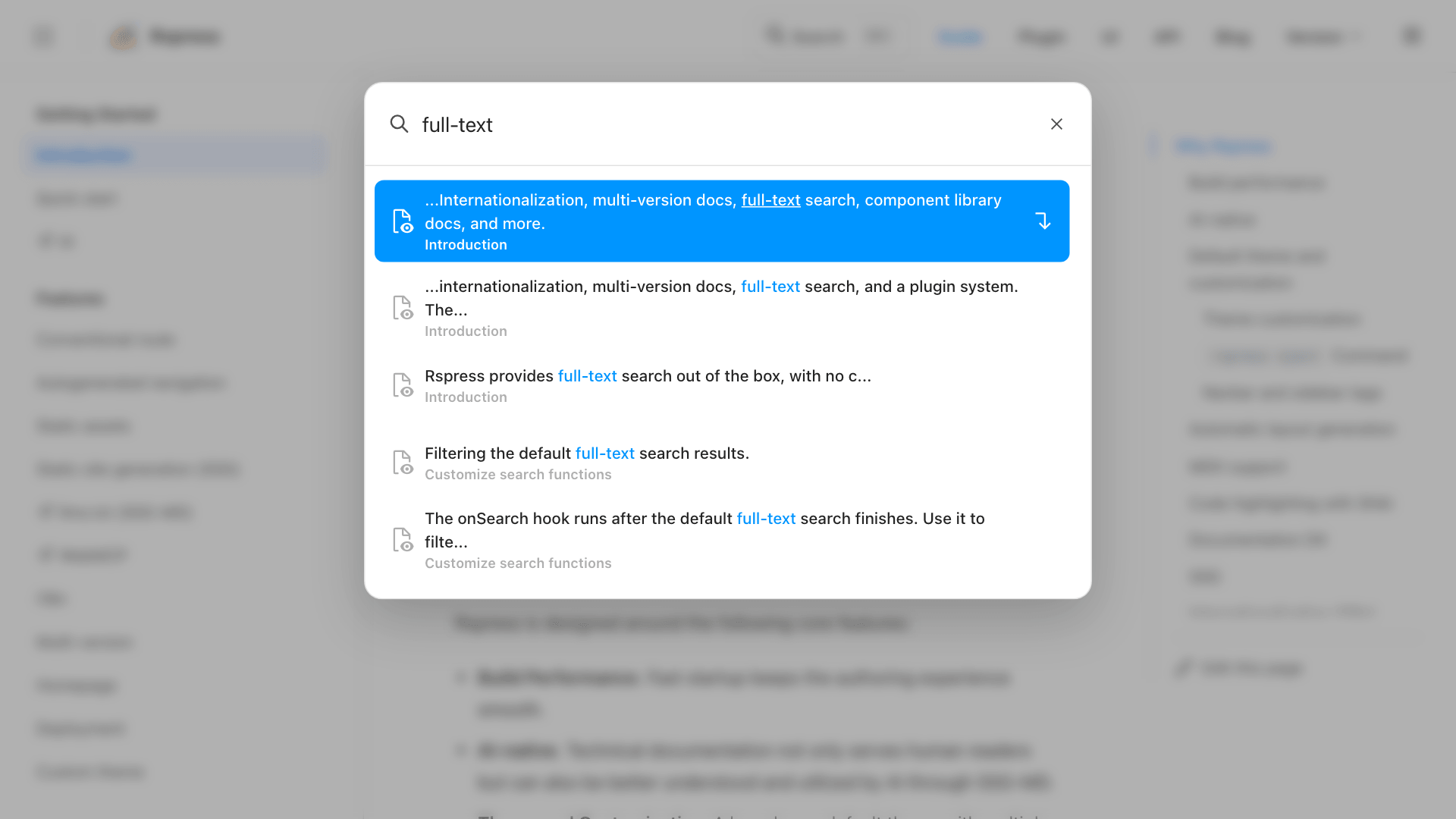
See Full-text search.
Shiki transformers enabled by default
Markdown code blocks and CodeBlockRuntime now enable these Shiki transformers by default:
Rspress also re-exports all @shikijs/transformers exports from @rspress/core/shiki-transformers, so you can import additional transformers without installing a separate package.
Use markdown.shiki.transformers to add transformers or customize a default transformer. A custom transformer with the same name replaces the corresponding default while preserving the others. See Shiki transformers for examples.
Built-in sitemaps
Rspress 2.1 generates sitemap.xml by default during production builds. Installing @rspress/plugin-sitemap is no longer necessary.
Set the deployment origin with siteOrigin and the subpath with base to generate absolute URLs:
Use the top-level sitemap option to configure priorities, update frequencies, and individual page entries. Existing projects can use it to replace @rspress/plugin-sitemap.
Sitemaps are generated even with ssg: false. Set sitemap: false if another process generates your sitemap.
Clean URLs by default
route.cleanUrls now defaults to true instead of false. Generated links for regular pages omit .html, for example changing /guide/getting-started.html to /guide/getting-started.
Your hosting platform must serve /foo.html directly when /foo is requested. Set route.cleanUrls: false if your host does not support this or you need to keep the .html suffix.
Internal anchor validation by default
markdown.link.checkAnchors now defaults to true instead of false. Rspress checks whether linked sections exist, catching stale links such as /guide/config#old-heading after a heading is renamed.
Validation covers same-page, relative, and absolute internal links to Markdown and MDX pages, and skips external URLs. Use markdown.link.checkAnchors.excludes for anchors that cannot be identified statically, such as dynamically generated anchors, or set checkAnchors: false to disable validation.
React Router data mode
Rspress now uses React Router Data mode. Default theme links and useNavigate() calls load the destination's data and code before switching the URL and page content. The current page stays visible while loading.
With React Router 7, the navigation function returned by useNavigate() supports await to wait for navigation to finish.
The new ErrorLayout error page offers reload and home actions when page loading or rendering fails. It also shows error details in development. Custom themes can replace ErrorLayout.
Scroll restoration
Rspress restores the scroll position when readers go back, go forward, or reload. For example, after reading partway through a long page, visiting another page, and going back, readers can continue where they left off. React Router also handles anchor navigation.
Upgrade checklist
-
Update
@rspress/coreand any official plugins used by your project, for example:package.json -
Check server rendering compatibility for SSG-MD. Wrap browser-dependent content in
BrowserOnly. Settingssg: falsedoes not disable SSG-MD. Sites that cannot support server rendering need bothssg: falseandllms: false. -
If you customized the
SearchPaneltheme styles, visually check the desktop and mobile layouts after upgrading to confirm they still look as expected. -
Remove manually configured default Shiki transformers from
markdown.shiki.transformers. -
Check your sitemap configuration. Replace
@rspress/plugin-sitemapwith the built-insitemapoption, or setsitemap: falseif another process generates the sitemap. -
Check that your host supports URLs without
.html, such as serving/foo.htmldirectly when/foois requested. Setroute.cleanUrls: falseto retain the previous link format. -
Run a production build and fix invalid anchors. Exclude dynamically generated anchors with
markdown.link.checkAnchors.excludes, or setcheckAnchors: falseto disable validation.
See the Rspress 2.1 Release Notes for the complete changelog.
Thank you to everyone who contributed to this release! Share feedback on GitHub, or join the conversation on Discord.